PPD861D Hot Air Gun is nearly same as QUICK 861DW.
many technicians don't pay attention to safety, or don't care how to
use hot air rework station, Resulting in some accidents that should not
be caused. here we list some Safety instructions when you use ppd 861d
plus hot air rework station, it also works for other rework station.
1. please avoid the abuse of the dismantling welding table, and use PPD861D Hot Air Gun according to the instruction manual.
2. The outlet and surrounding may have extremely high temperature, Caution should be taken to prevent scalding.
3. Do not work, the handle must be placed on the handle rack correctly,
must not be paced on the work table, other places, after the work is
finished, let the machine automatically cool below 100 degrees celsius,
state) to turn off the power switch.
4. please keep the outlet open and there is no obstruction.
5. do not put sharp objects on the wind piple, so as not to damage the leather tube.
6. the minimum distance between the outlet and the object is 2mm when used, and the outlet is calculated.
7. Suitable wind Tsui can be selected for different jobs, the temperature may vary slightly with the use of the air nozzle.
8. long after work is finished, please pull out the power plug.
9. handle with care, do not touch the handle or make the machine vibrate strongly
10. do not use it when we or dismantling, so as not to cause short circuit or electric shock.
11. do not use near inflammable gas or other inflammable substances, do
not immediately use the machine after use, it is paced around flammable
gased or flammable objects.
12. in some areas, such as walls, ceilings, floors, arches or other
flammable flammable materials, objects, such as those used in these
areas, are likely to ignite these materials and may not be. easily
discovered, resulting in property damage and casualties, when working in
these areas, do the best the volume of the hot air dismaintling handle
moves backwards and forwards, leaving or stopping at at certain point
will make the board face, combustion of flammable materials.
13. children do not know the dangers of electrical products, please do
not use where children can touch deposit. don't let the child get close
and touch.
2018年9月24日星期一
2018年9月20日星期四
WOYOsmart Series Tools, which one is the best choice?
WOYOU SMART tries our best to offer the opportunity to enhance personal ability and realize individual value. as a newer plintless dent repair manuafactory, woyo is your best choice.

Today, Let’s collection all WOYOsmart Series Tools, in order to let you find the right tools more easlier.
1. WOYOSMART Paintless Dent Repair WOYO PDR-007
Unlike traditional PDR, the PDR HOT BOX is the cleanest and fastest way for fixing hail or boulders dents, door dings and other minor soft dents. Induction heating is the highest tech method for removing soft dents, the result is a clean dent repair in a fraction of the time compared to a conventional PDR tool.
2. WOYO UC009 Ultrasonic Cutter
this is the new item from woyo company in 2018 year, that is with Efficient for cutting and deburring of composite material of FRP and plastic materials. Most suitable for accurate correction work required on PCB
3. WOYO HBR012 Heater Rust Converter
When repairing machinery, you will frequently find that some bolts are exceptionally difficult to remove.The traditional solution to this problem has been to apply a flame to the bolt, which will loosen it, but this method is both dangerous and time consuming.With today’s, inefficient parts remove can seriously erode your profit.The sooner vehicles can be repairs begun, the sooner you start making money.
4. WOYO Ultrasonic Cutter TUIREL Key Cutting
what’s the advantages of WOYO Ultrasonic Cutter?
High speed vibration 39,800 times per second, to maintain a stable
power and good surface
Power balance control, reduce the loss caused by the wrong operation
Stable operation, bring good surface craf.
Power balance control, reduce the loss caused by the wrong operation
Stable operation, bring good surface craf.
This light/reflection board is used to help operator easily repair the dent. By training part of the auto body on the light, the distorted part will reflect where the dent is. It is suitable for light color car or highlight condition in particular. You can also adjust the color temperature by yourself. With LED display and three suckers, you would be clear about the exact color temperature and the repair work would be much easier.
6. WOYO Remote Control Tester
WOYO Remote Control Tester has been developed to assist with the diagnosis of all types of (IR) Infra Red and (RF) Radio Frequency remote controls. WOYO Remote Control Tester can be used on most makes and models of vehicles including trucks, remote control models and domestic appliances.
2018年9月16日星期日
How to fix iPhone X Won’t Turn on and black screen
Some users maybe will meet such issues, like your iphone X physically
damaged, or Dropped in water or other reason, what can you do when your
iPhone X Won’t Turn on and black screen? today we will give you some
suggestions, you just have an try. also there are many solutions from
website, hope you can find a right way to solve your problems.

1. Force restart your iPhone X
To restart your frozen iPhone X:
Press and quickly release the Volume Up button
Press and quickly release the Volume Down button
Press and hold the Power button until you see the Apple logo
2. Just try charge your iphone X
some time, the earlier way is more important too, you just connect your iphone X to the charge, maybe your iphone X will start turning on
3. Restore using 3uTools
Download 3uTools software, coonect the iphone X to the PC, THen enter DFU mode to restore.

4. Disassemble and testing it.
iphone X motherboard which made of two boards soldering together, it is too difficult to separate the folded motherboard, which need the Precise temperature controlling, you can use PPD120X, which is Do separating working on the upper and lower motherboards of iphone X, avoid motherboard damaged, increase maintenance speed, Don't need the hot Air Rework station, working on 230℃, iPhone X logic board Desoldering Rework Station tool.
After separated the logic board, you need testing the upper/Lower layer current with DC power supply, the power supply voltage with Multimeter. to find the abnormal. and fixed it.

when you fixed the problem, you need Double-board quick installation, in order to save more time and sucess, Iphone X PCB Positioning Fixture play an import role in this processing, that will help you quickly re-solder the two boards and reassemble the iphone X.

1. Force restart your iPhone X
To restart your frozen iPhone X:
Press and quickly release the Volume Up button
Press and quickly release the Volume Down button
Press and hold the Power button until you see the Apple logo
2. Just try charge your iphone X
some time, the earlier way is more important too, you just connect your iphone X to the charge, maybe your iphone X will start turning on
3. Restore using 3uTools
Download 3uTools software, coonect the iphone X to the PC, THen enter DFU mode to restore.

4. Disassemble and testing it.
iphone X motherboard which made of two boards soldering together, it is too difficult to separate the folded motherboard, which need the Precise temperature controlling, you can use PPD120X, which is Do separating working on the upper and lower motherboards of iphone X, avoid motherboard damaged, increase maintenance speed, Don't need the hot Air Rework station, working on 230℃, iPhone X logic board Desoldering Rework Station tool.
After separated the logic board, you need testing the upper/Lower layer current with DC power supply, the power supply voltage with Multimeter. to find the abnormal. and fixed it.

when you fixed the problem, you need Double-board quick installation, in order to save more time and sucess, Iphone X PCB Positioning Fixture play an import role in this processing, that will help you quickly re-solder the two boards and reassemble the iphone X.
2018年9月9日星期日
Free Download Software For UP-828P Ultra Programmer

another reason, the UP-828P software updated on 2018/05/22, the newest software version is V2.0.1.0, if you haven't UP-828P High Speed programmer's software or your UP-828P software is too old, you can download as follows:
Free Download UP-828P Ultra Programmer Software:
http://www.up48.com/download/UP828PSetup.exe
UP-828P series Programmer Adapters:
Suit for pin pitch 0.65mm,0.75mm,0.8mm, 1.0mm,0.5mm etc devices;
Support Package: BGA, EBGA, SOP, TSOP, PSOP, TSSOP, SDIP etc..
UP-828P series Programmer Adapters list for UP-828P Ultra Programmer list:
EBGA64P Suit for 1.0mm pin pitch BGA package chips, 8X8 arrays
FBGA137P Suit for 0.8mm pin pitch BGA package chips, Supports chips found in many feature and burner phones
FBGA167P Supports some of the NAND memory chips found in feature and older smartphones
VBGA56P Suit for 0.5mm pitch BGA56 package chips
VBGA162P Suit for 0.5mm pitch BGA package chips, MOVINAND/iNAND/eMMC
VBGA186P Supports EMMC memory found on newer smartphones and tablets
VBGA169P Suit for 0.5mm pitch BGA package chips, Supports some MOVINAND/iNAND/EMMC memory found on the newer BlackBerry 9000 series devices and many Android phones
VBGA169EX4 Suit for 0.5mm pitch BGA package chips, MOVINAND/iNAND/eMMC
VBGA11P5 For iphone IC
VBGA153P 162P Suit for all kind of eMMC type chips.
VBGA134P For iphone IC
LGA52P For iphone IC
SOIC8SX4 SOP package
SOIC16WX4 SOP package
SBGA199P Supports some of the NAND memory chips found on the early 9000 BlackBerrys and other phones (0.65mm)
SBGA152P For BlackBerry Devices
BGA169P Supports some MOVINAND/iNAND/EMMC memory found on the newer BlackBerry 9000 series devices and Android phones
UP-828P Adapter TSOP56AP
UP-828P Adapter TSSOP8P
UP-828P Adapter VBGA40P
UP-828P Adapter VBGA48P
UP-828P Adapter VBGA56P
UP-828P Adapter VBGA64P
UP-828P Adapter VBGA133P
UP-828P Adapter VBGA134SP
UP-828P Adapter VBGA160P
UP-828P Adapter VBGA162NP
UP-828P Adapter VBGA168P
UP-828P Adapter VBGA240P
UP-828P Adapter VBGA318P
UP-828P Adapter VBGA128P
UP-828P Adapter SBGA104P
UP-828P Adapter SBGA137NP
UP-828P Adapter SBGA137RP
UP-828P Adapter SBGA152P
UP-828P Adapter SBGA165P
UP-828P Adapter SBGA188P
UP-828P Adapter SBGA188AP
UP-828P Adapter SBGA188BP
UP-828P Adapter SBGA202P
UP-828P Adapter SBGA202AP
UP-828P Adapter SBGA225P
UP-828P Adapter UBGA48P
UP-828P Adapter UBGA56P
UP-828P Adapter BGA48P
UP-828P Adapter BGA56P
UP-828P Adapter BGA63P
UP-828P Adapter BGA67P
UP-828P Adapter BGA71P
UP-828P Adapter BGA72P
UP-828P Adapter BGA73P
UP-828P Adapter BGA80P
UP-828P Adapter BGA80RP
UP-828P Adapter BGA80RNP
UP-828P Adapter BGA81P
UP-828P Adapter BGA81TP
UP-828P Adapter BGA84P
UP-828P Adapter BGA85P
UP-828P Adapter BGA85TP
UP-828P Adapter BGA88P
UP-828P Adapter BGA93P
UP-828P Adapter BGA95P
UP-828P Adapter BGA96P
UP-828P Adapter BGA100P
UP-828P Adapter BGA103P
UP-828P Adapter BGA105P
UP-828P Adapter BGA107RP
UP-828P Adapter BGA107NP
UP-828P Adapter BGA110P
UP-828P Adapter BGA115P
UP-828P Adapter BGA149P
UP-828P Adapter SOIC8SP
UP-828P Adapter SOIC8P
UP-828P Adapter SOIC8SPX4
UP-828P Adapter SOIC8PX4
UP-828P Adapter SOIC16WP
UP-828P Adapter SOIC16WPX4
UP-828P Adapter EBGA24P
UP-828P Adapter EBGA64P
UP-828P Adapter EBGA100P
UP-828P Adapter FBGA107NYP
UP-828P Adapter FBGA115P
UP-828P Adapter FBGA119P
UP-828P Adapter FBGA144P
UP-828P Adapter FBGA63SP
UP-828P Adapter WSON8P
UP-828P Adapter WSON8WNP
UP-828P Adapter WSON8X4P
UP-828P Adapter WSON8WNPX4
UP-828P Adapter COB50PX2
UP-828P Adapter LGA44P
UP-828P Adapter VBGA169P
UP-828P Adapter VBGA169PX4
UP-828P Adapter VBGA162P
UP-828P Adapter VBGA162PX4
UP-828P Adapter VBGA186P
UP-828P Adapter VBGA221P
UP-828P Adapter VBGA221PX4
UP-828P Adapter VBGA186PX4
UP-828P Adapter LGA60P
2018年9月3日星期一
which is a good soldering station for repairing phones?

Before you selecting the soldering iron for mobile repairing, it is important to choose the best and high quality tool, which is inexpensive and makes your working more easily and confortable,you have to find from your local market or online shop, such as nandrepair.com-with the good qality phone repair soldering station you will be happy that you had the right tools.
Below we listed some of high quality phone repair soldering station
1. QUICK 861DW Hot AIr Rework Station
It is orginal from QUICK Company- Famous soldering station provider from china. it is one of the largest manufacturer of soldering tools and the related products in China. including soldering stations, rework stations, soldering robots, dispensing robots, BGA rework systems, fume extractors, static eliminators.
Quick 861DW Soldering Iron Rework Station is an Professional Digital Soldering Rework Station with 3 Nozzles SMD Rework Station 110V 1000W Lead Free. For more informations, you can check the product no SE020.
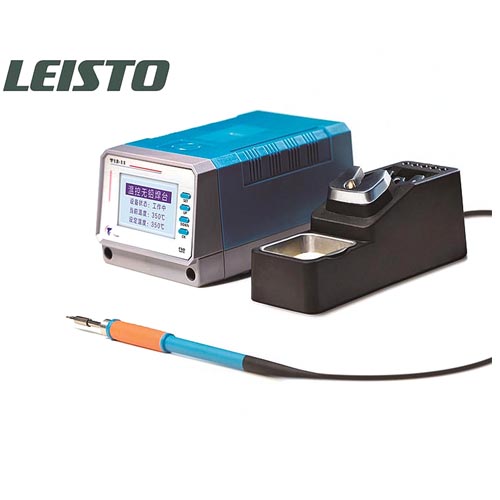
2. LEISTO T12-11 Lead Free Soldering Iron
LEISTO T12-11 Soldering Iron for mobile device Motherboard Repair, T12-11 Soldering Station is the Lead Free, high-accuracy Temperature, Adjustable Constant-Temperature and Anti-static Soldering Station. Digital Intelligent T12-11 is used for welding wire and electronic components on cell phone logic board
LEISTO T12-11 phone repair digital intelligent lead-free soldering station with 3pcs Soldering Iron Tip, Mobile phone soldering iron Option AC 220V / 110V input, English language display, professional phone PCB soldering repair tool.
3. PPD120E PPD 120E A8 A9 A10 A11 Desoldering Tool
Mini PPD120E Desoldering Rework Station for iphone A8 A9 CPU CHIP, iphone A8 A9 Remove Welding Platform, PPD120E A8 A9 CPU unsolder tool. PPD120E iPhone motherboard professional tool for A8 A9 CPU Desoldering Rework Station, PPD120E iphone 6 6S A8 A9 CPU unsolder tool / Desoldering Rework Station
Optional Voltage: 110V / 220V
unsolder the A8 A9 CPU from iphone motherboard, don't need the hot Air Rework station, working on 230℃, it is the Desoldering Rework Station tool for unsolder iphone A8 A9 CPU.
2018年8月30日星期四
How to use Rolling Code Remote control Duplicator key copier TW89 jammer
433Mhz / 315Mhz Remote Control Code Scanner Detector key copier is an Adjustable frequency Car key remote control Wireless Remote Key Code Scanner Detect, receive, copy car remote control signals, then command the car as freely as the car’s owner. here is the Instruction of Adjustable Frequency Remote Control Receiver and Replicator. it sepcials for car repair service, garage and workshop.

1. Instruction for each 2-in-1 433Mhz/315Mhz Remote Control key copier buttons and switches:

1. Instruction for each 2-in-1 433Mhz/315Mhz Remote Control key copier buttons and switches:
(1 2 3 4 )transmit button: 4 keys usually the same as the general remote code key button
( 5 ) select code button: function keys: pressing a back one set of code, long-press more than two seconds to pop up a menu withk (6 keys) to select the function of the mouse, point functions transferred to the menu, press (5 key) to enter.
( 6 ) renewal format button: press once again becomes automatic – red – Lan1 – cycle variations between Portland 2. Transferred automatically when the rolling code transmitter, then press and hold the (1 2 3 4 ) issued a code key in any key, press once to launch a rolling code format, continuous operation 16 times (please observe the display changes when the display the words in the rolling code the latter figure a gradually increasing to 16 from indicating that it has completed 16 operations), in which 16 operations to be tested if the remote host reaction, indicating that the rolling code has been supported by the product, if there is no response Description This machine does not support rolling code Tips: now available in the so-called rolling code can test all products are unscientific does not exist, please pay attention to identify fake information.
Try (blue light) when transmitting fixed code, if no response try again (red) or (blue 1), which has a total of three formats can be tested.
( 5 ) select code button: function keys: pressing a back one set of code, long-press more than two seconds to pop up a menu withk (6 keys) to select the function of the mouse, point functions transferred to the menu, press (5 key) to enter.
( 6 ) renewal format button: press once again becomes automatic – red – Lan1 – cycle variations between Portland 2. Transferred automatically when the rolling code transmitter, then press and hold the (1 2 3 4 ) issued a code key in any key, press once to launch a rolling code format, continuous operation 16 times (please observe the display changes when the display the words in the rolling code the latter figure a gradually increasing to 16 from indicating that it has completed 16 operations), in which 16 operations to be tested if the remote host reaction, indicating that the rolling code has been supported by the product, if there is no response Description This machine does not support rolling code Tips: now available in the so-called rolling code can test all products are unscientific does not exist, please pay attention to identify fake information.
Try (blue light) when transmitting fixed code, if no response try again (red) or (blue 1), which has a total of three formats can be tested.
Three switch:
The first button is turned off
The second tranche is wide and modern special test for the long-range wide receiver and transmitter and modern remote control codes.
The third button for all rolling code and fixed code remote control and extensive testing of the modern shared, you can access
The machine supports closing rolling code and fixed code and wide of the modern remote control, but the wide receiver and modern remote control distance is not ideal.
The second tranche is wide and modern special test for the long-range wide receiver and transmitter and modern remote control codes.
The third button for all rolling code and fixed code remote control and extensive testing of the modern shared, you can access
The machine supports closing rolling code and fixed code and wide of the modern remote control, but the wide receiver and modern remote control distance is not ideal.
2: remote control test
Universal remote control test: the third gear switch is in third gear, the machine can receive and transmit support roll
Move code and fixed code remote control coding details, please refer to (6) renewal code format button
The wide and modern remote control test: the third gear switch is in second gear, received wide of the post-modern remote control can directly open
Move code and fixed code remote control coding details, please refer to (6) renewal code format button
The wide and modern remote control test: the third gear switch is in second gear, received wide of the post-modern remote control can directly open
3: password function
This function is a local initiative in its class, is a major feature of this product for the owner restricts all unauthorized use. When the machine is factory set to require a password before they can open access, the initial password is 123654.
Turn off the password function: in the boot state, press (5 key) and hold until the display appears a function menu
Single re-release (5 keys), press (5 key) 2 seconds after the release, display the password off.
Open the password function: in the boot state, press (5 key) and hold until the display shows a functional food
Single re-release (5 keys), press (5 key) 2 seconds after the release, showing Please enter a password
Please enter the six-digit password, if you enter the correct password will display the password to open. Note: secret Code will not open the password function is lost, please take good care of your password.
Change Password: in the boot state, press (5 key) and hold until the display a function menu appears again
Release (5 key), “press and hold (5 key) 2 seconds after the release, showing off the password in the password needed to open this state,” and then press and hold the (key) two seconds after release, showing Please enter a password Please enter the six-digit password, if you enter the correct password will display the password to open, then press and hold (6 keys) 2 seconds after the release, once again prompted to enter a new six-digit password, when prompted to enter a new 6
Digit password, enter the password has been changed again prompt, change passwords success. Then press any key to return.
Turn off the password function: in the boot state, press (5 key) and hold until the display appears a function menu
Single re-release (5 keys), press (5 key) 2 seconds after the release, display the password off.
Open the password function: in the boot state, press (5 key) and hold until the display shows a functional food
Single re-release (5 keys), press (5 key) 2 seconds after the release, showing Please enter a password
Please enter the six-digit password, if you enter the correct password will display the password to open. Note: secret Code will not open the password function is lost, please take good care of your password.
Change Password: in the boot state, press (5 key) and hold until the display a function menu appears again
Release (5 key), “press and hold (5 key) 2 seconds after the release, showing off the password in the password needed to open this state,” and then press and hold the (key) two seconds after release, showing Please enter a password Please enter the six-digit password, if you enter the correct password will display the password to open, then press and hold (6 keys) 2 seconds after the release, once again prompted to enter a new six-digit password, when prompted to enter a new 6
Digit password, enter the password has been changed again prompt, change passwords success. Then press any key to return.
4: storage code
User access storage code is important, it will not be stored for long periods wash, first select this group of useful code, then long press over (5 key) 2 seconds, the menu will pop up, press (6 keys) so that the mouse pointer (deposit access code), press (5 key) to confirm, then the machine will ask you to enter a password, please enter a valid password for this machine, and then enter the access code status, then you can choose the location you want to access, press (5 key ) confirmed that the press (6 keys) to select or remove memory, press (5 key) to confirm complete access. Press any key to return to the receiving state 1234.
Tip: Please plug in an external ear wire (antenna) when receiving a signal, in order to achieve the best distance!
2018年8月27日星期一
you need an oscilloscope to repair you phone
There many tools used on phone repair service, such as phone repair soldering iron, phone power supply and nand test fixture. except these tool, is there essential device for this work? yes, indeed, you need an oscilloscope to repair you phone.

But, Why use an UNI-T UPO8102S oscilloscope to repair you phone?
In the process of mobile phone repair, the oscilloscope is mainly used to detect the voltage and signal waveform of the key points on the main board (DC power suppply of each part of the mobile phone, 26MHz main clock, 32.768kHz real-time clock, IQ signal of intermediate frequency output, ect), which can be delineated. Range, quickly find the point of failure. Therefore, the oscilloscope has been widely used in mobile phone repair.
The difference between a multimeter, power supply and osciloscope
Because the oscilloscope looks at the complete waveform, it displays the voltage value from the lowest value to the highest value of the trajectory, so the measurement is often the highest value. The value measured by the multimeter is the average value, which is different from the highest value.
For example, using a multimeter to measure the voltage of civilian electricity is 220V, which is the average. But when you look at it with an oscilloscope, you can see about 311V, which is the peak. That is the maximum. The multimeter has six and a half nine and a half, but it can only measure stable values. The advantage of the oscilloscope is that is has a large dynamic range, can monitor the time and frequency, can have a trigger signal, and can compare, capture, and store multiple channels.
订阅:
博文 (Atom)